 Current release: StarBeans 8.2- March 17 2018


What is StarBeans?
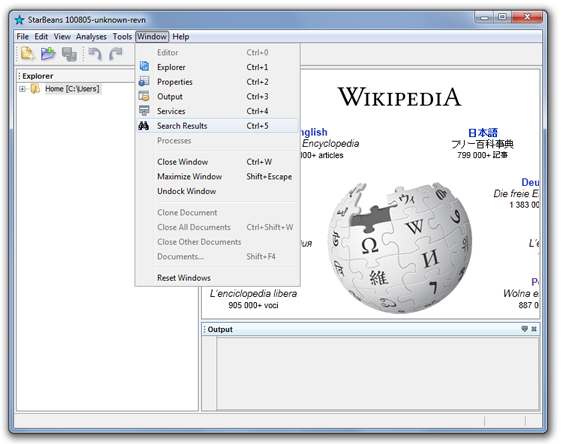
StarBeans is an application build on NetBeans generic platform which serves as a foundation for BioBeans and GenBeans projects. StarBeans offers a standard look and feel, a project-free file management system, file editing using NetBeans editor and embedded web browsing based on NetBeans JavaFX webkit browser..
From the NetBeans platform point-of-view, all bundles properties have been branded to create a consistent application; all menus have been properly organized; all items more or less related to code development have been removed. StarBeans contains its own explorer located on the left side of the main window for the management of files including opening and creation of files through wizards. Files with defined MIME types can be edited in the Editor window with all the facilities found in NetBeans including syntax highlighting and various bars located in the four cardinal directions, editor toolbar, status bar, etc..
What's new in this version?
Version 8.2: Code update to current NetBeans version. The DJ Native Swing browser has been replaced by NetBeans JavaFX webkit browser. Frederic Lavigne Tip's code has been integrated in the Startip module to offer startup tips.
Version 7.4-8.0: Code update to current NetBeans version. An attempt to switch to JavaFX for the browser failed; we likely have to wait for Java 8 and next NetBeans release to clean this area.
Version 7.3.1: Code update to current NetBeans version. The extbrowser module is not part of the distribution due its deeper embedding in NetBeans source. As a result it is not possible to choose the DJNative swing browser anymore in the options panel. To direct web browsing to the external browser, the DJNativeSwing-SWT module must be uninstalled; to get the internal browsing back, StarBeans needs to be re-installed.
Version 7.2: Code update to current NetBeans version. The DJNS embedded browser failed to work properly on Ubuntu; maybe you will be luckier on your distro. This is a recurrent problem with DJ Native Swing on Linux and no attempt have been made to address the issue.
Version 7.1.2: Code update to current NetBeans version.
Version 7.0.x: The implementation of DJ Native swing embedded browser has been rewritten. The current implementation has the embedded browser as an option in the General option panel, Web Browser drop-down. A multiwindow embedded browser as default can be enabled instead - see the xml layer of the DJNS-SWT module. For compatibility with Mac OS X, the screen menu bar has been disabled on this platform.
Version 6.1.9c: conf files have been reformatted to allow proper launching on Linux and Mac OS X.
Version 6.1.9b:All biomodules have been transferred into the BioBeans suite. Support for embedded browser based on the DJ Native Swing project has been added. This is the implementation described by Geertjan Wielenga on The NetBeans Zone. Support for OS ions has been added. Unrecognized file types can be presented with their original OS icon in the Explorer with the default action set to open-in-system action. This result in cool effects on selected MIME types for which editors are only available outside the platform environment. The upgrader module was added for license check in absence of specific installer. This is a copy of o.n.upgrader with only the license part without settings import.
Modules
StarBeans contains the following specific modules:
Corelite. This modules brings additional functionalities to the platform.
Contex2Action allows dynamic changes in menus based on the enable state of sets of actions listed in the xml layer. It also control the number of items that are shown inline. These classes were designed to have varied context menus in a single editor window depending on where the user clicks in the text. Note that Mac OS X screen menu bar is incompatible with these classes. Please, send code improvements and suggestions.
The code of the Favorite module is duplicated in Corelite module to allow 1) The OpenDir action to mount a new directory from the main menu rather than through a counterintuitive right-click in the Favorite window; 2) The ability to open children nodes to make the Explorer more interactive; implementation of a navigator would most likely supersede this function; and 3) Expand folders in new Explorer windows (not-persistent). Remove the explorer code and enable the Favorite module to go back to the Favorite window.
Starview. Support for NetBeans embedded webkit browser using JavaFX. This module requires the paltform to be build with Java 8.
Startip. This module provides startup tip support based on Frederic Lavigne's code (l2fprop.com).
HTMLite. A simplified version of NetBeans HTML module for opening HTML files in web browser. HTML editing is possible but syntax highlighting is not functional.
Starcore. The branding module.
Upgrader. A simplified version of NetBeans upgrader module to handle the license during manual installations. Keep the var folder in the build suite to prevent license check or remove the var module and add a LICENCE.txt file in org/starbeans/core/license to have a check the first time the application is launched.
Building StarBeans
StarBeans version number is identical to the version number of NetBeans it was build upon. Download the source and follow the instructions in the readme text. If you want to build on a more recent platform, you are very much on you own but you can try the following (some menus might be missing and new one appear): open the sbbuid project in StarBeans source; remove the HTMLite and HTMLite Lexer modules; in the project properties, libraries tab, set the platform to the platform coming with your NetBeans distribution and make sure that Favorite and RCP Platform modules are not included in the platform cluster; also remove all dependencies to editor modules in the Starcore module and launch.
Files |
NetBeans |
Size |
|
|---|---|---|---|
6.8 |
4.54 MB |
||
6.9.1 |
4.54 MB |
||
6.9.1 |
18.8 MB |
||
7.0 |
37.9 MB |
||
7.0 |
25.5 MB |
||
7.0.1 |
12.5 MB |
||
7.0.1 |
25.8 MB |
||
7.1.2 |
12.5 MB |
||
7.1.2 |
27.3 MB |
||
7.2 |
13.1 MB |
||
7.2 |
31.7 MB |
||
7.3.1 |
13.4 MB |
||
7.3.1 |
32.1 MB |
||
7.4 |
13.5 MB |
||
7.4 |
34.9 MB |
||
8.0 |
13.6 MB |
||
8.0 |
34.9 MB |
||
8.0 |
1.9 MB |
||
8.0 |
27.8 MB |
||
8.2 |
1.8 MB |
||
8.2 |
27.3 MB |

